Plane Finder - Flight Tracker
- 4.6
- Rating
- 1.00M
- Installs
- Free
- Price

 Analysis by App-foxy
I like flight-tracking apps most when they answer a practical question quickly: Is that aircraft still in the air, where is it going, and should I expect it soon? Plane Finder - Flight Tracker is built around that simple need, but it also has enough detail to satisfy people who enjoy watching aviation for its own sake. After spending time with it, my view is that it works best as a visual, live-flight companion rather than as a complete replacement for an airline’s own travel tools.
The app sits in the Travel & Local category and is developed by pinkfroot limited. It is free to download, with optional in-app purchases ranging from $1.99 to $19.99 per item. The basic attraction is clear: flights appear on a real-time map, and selecting one opens more information than a normal airport departure board usually gives you. That makes it useful both when I am waiting for a passenger and when I simply want to understand the traffic moving overhead.
Its long presence in the category also shows in its history. Plane Finder was released on September 12, 2010, and the current version is 2026.1.3. It has passed one million installs, holds a 4.5 average from around fifteen thousand ratings, and is marked suitable for Everyone. Those figures do not tell me whether every individual flight will appear exactly when I expect it, but they do suggest a mature app with a substantial user base rather than a short-lived experiment.
You May Also Like

 Blood Strike: 2.5 Anniversary
Blood Strike’s Loadouts Turn Every Drop Into a Tactical Gamble
A close look at Blood Strike’s custom loadouts: how fast access to signature weapons reshapes its battle royale rhythm, rewards preparation, and narrows the gap between fights.

 Pandora - Music & Podcasts
Pandora’s Music Is Easy to Start, but Harder to Recover
Pandora’s strength is its low-effort path from a seed to a station. Its weak spot is how much confidence it asks you to place in connection, setup, and quiet recovery.

 8 Ball Pool
 Is Built on Rivalries, Rematches, and Routine
A close look at the rivalries, rematches, shared routines, and unanswered safety questions that turn a quick pool match into a persistent mobile community.

 Samsung Music
’s Quiet Strength Is Playing What You Already Own
Its reach comes less from spectacle than from dependable access to a personal library. That simplicity is both the app’s strongest retention engine and its ceiling.

 AccuWeather: Weather Radar
AccuWeather Review: A Quick, Clear Forecast for Everyday Decisions
For everyday plans, the best forecast is the one you can understand quickly. AccuWeather makes rain timing, radar, and local conditions easy to act on, with a few trade-offs.

 Hill Climb Racing
Why Hill Climb Racing Still Turns Crashes Into One More Run
A tiny car, a bumpy hill and one more upgrade: Hill Climb Racing keeps resurfacing because its simple chaos makes every near-miss feel personal.
More From Our News Desk



What makes the live map genuinely useful
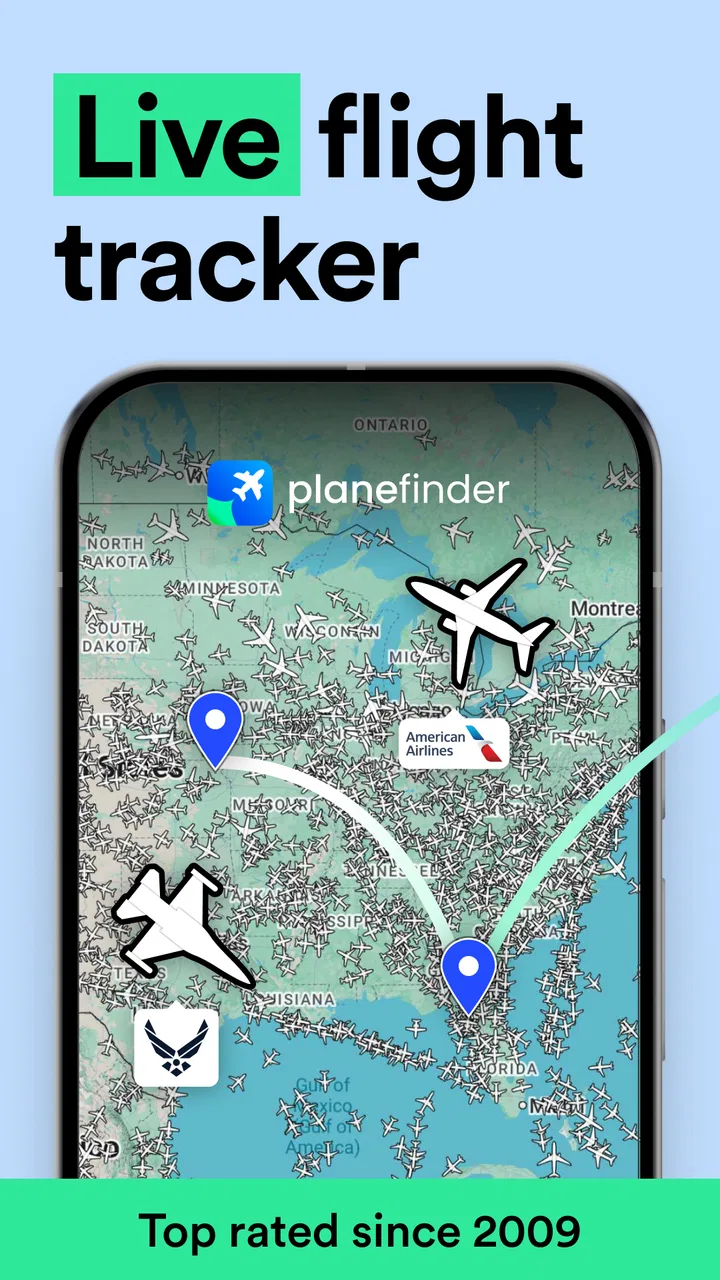
The live map is the heart of the experience. Instead of forcing me to search by airport first, it gives me a geographic view of aircraft activity. I can zoom toward a city, coastline, or airport and see the surrounding traffic as a moving picture. That is more intuitive than scanning a long list when I do not yet know the flight number.
This matters in everyday situations. If a family member is flying into a nearby airport, I can open the map while travelling to the pickup area and get a better sense of where the aircraft is in relation to the airport. I still treat the airline’s arrival information as the authority for gate changes, baggage collection, and final scheduling, but the map gives me useful context between those formal updates.
I also found the map more engaging than a plain status screen. A list tells me that a flight is delayed or airborne; a map helps me see the route developing. When several aircraft are approaching the same airport, the visual layout can make the situation easier to understand than a table of times. For aviation fans, that spatial view is likely the main reason to keep the app installed.
Selecting an aircraft is where the app becomes more than a moving wallpaper. The detailed flight information helps connect the icon on the map with a particular journey. I can use the aircraft’s position as a starting point, then inspect its route and status rather than guessing which plane I am looking at. This is especially handy around busy airports, where many symbols can otherwise blend together.
A useful habit is to begin with the map when I am curious, then switch to a specific flight once I have identified it. Starting with a flight number is faster when I already have that information. Starting geographically is better when I am watching local traffic, checking an airport’s activity, or following a plane that has just appeared in the distance. The two approaches serve different purposes, and the app is strongest when I use each deliberately.
Good for curiosity as well as travel planning
Plane Finder is not limited to people with a boarding pass. I can imagine using it while plane-spotting, looking at traffic near a home or hotel, or showing a child how routes connect different places. The interface turns otherwise invisible movement into something understandable. That educational quality is easy to overlook, but it gives the app a wider audience than frequent flyers alone.
It is also useful for checking the broader picture before leaving for an airport. If I know that several flights are arriving close together, the map can help me appreciate why the terminal may become busy. It cannot tell me exactly how long security or baggage claim will take, but it can add a layer of situational awareness that a single airline notification does not provide.
For a traveller meeting someone, my preferred workflow is simple. I check the airline or airport information for the official schedule, use Plane Finder to follow the aircraft once it is in the air, and only leave for the pickup point when the remaining journey makes sense. That prevents the common mistake of treating a live map as a promise of immediate arrival. The app is most valuable as a supplement, not as the only source for time-sensitive decisions.
Three ways to get more from the app
First, I would use the map as a discovery tool rather than repeatedly typing flight numbers. A flight number is precise, but the map reveals nearby alternatives when a booking changes or when I am unsure which service a friend is taking. Once I identify the right aircraft, the detailed view becomes much more useful than a broad scan of the area.
Second, I would avoid judging a flight’s progress from distance alone. A plane that looks close on the map may still need to follow an approach pattern, hold, or route around other traffic. The practical lesson is to combine the aircraft position with the displayed flight details and the official airport information. That small change in habit makes the app less likely to create false confidence.
Third, I would use it before an airport visit to understand the surrounding traffic, then close it when I no longer need that context. The live map is absorbing, and it can encourage unnecessary checking. For a passenger who only needs a gate or boarding instruction, the airline app is usually more direct. Plane Finder earns its place when I want the wider airspace picture, not when I need every piece of terminal information in one place.
Another less obvious strength is the way the app supports two kinds of attention. I can glance at it for a quick answer, or spend time exploring aircraft and routes. Many travel utilities only serve the first purpose. Here, the same map can be practical during a pickup and enjoyable during a quiet evening at home. That flexibility helps explain why the app appeals to both travellers and aviation enthusiasts.
Where the experience needs careful handling
The biggest limitation is that a live flight tracker can look more exact than the real world. A moving aircraft icon feels authoritative, but flight information depends on data arriving and being interpreted correctly. I would not use Plane Finder alone to decide whether to rush through traffic, book a connecting service, or assume that a delayed flight will land at a particular minute.
This is not a criticism unique to this app; it is a basic trade-off of the category. The more visual and immediate the tracker feels, the easier it is to forget that airlines and airports remain the primary sources for operational decisions. Plane Finder is excellent for awareness, but it is not the place I would rely on for a last-minute gate change or a formal disruption remedy.
The map can also become busy. Near a major airport, many aircraft may appear at once, and the detail that makes the app interesting can make it harder to find one specific flight. I found that the experience is better when I zoom with a purpose and select deliberately instead of trying to interpret every symbol simultaneously. Users who prefer a clean, minimal checklist may feel that the visual approach asks for more attention than they want to give.
There is also a financial consideration. The app is free, but optional purchases are available, with individual items priced from $1.99 to $19.99. That arrangement is reasonable for people who only need the core tracking experience, but aviation enthusiasts should think about how far they want to go before paying for extras. I would start with the free experience and only spend money if a particular addition solves a real problem in my routine.
That recommendation is especially important for occasional travellers. If I fly once or twice a year and mainly need check-in, boarding passes, baggage information, and gate alerts, the airline’s app is likely the better first download. It is closer to the actual travel transaction. Plane Finder becomes worthwhile when I want independent visibility across airlines, a broad map, or a way to follow flights that are not part of my own booking.
How it compares with familiar alternatives
The usual alternative is an airline app. That option wins for booking management, check-in, boarding documents, loyalty details, and official operational messages. Plane Finder wins when I want to look beyond one airline or one reservation. It is more like an airspace window, while an airline app is a personal travel folder.
An airport website or departure board is another useful comparison. Airport information is often the better reference for terminal instructions and local announcements. Plane Finder offers more movement and geographic context, particularly when I want to see an aircraft’s progress before it reaches the airport. I would use both rather than expecting one to replace the other.
Finally, there are other dedicated flight trackers that may appeal to users who want a denser set of aviation tools or a different presentation style. Plane Finder’s advantage is the approachable map and the balance between quick viewing and detailed inspection. Its weakness, for the same reason, is that it may not satisfy someone who wants a highly specialized professional workflow. I see it as a strong middle ground: richer than a basic status page, less demanding than a specialist dashboard.
Who should install it
I recommend Plane Finder to people who regularly meet arriving travellers, live near an active airport, enjoy plane-spotting, or want a broader view of flights than their airline provides. It is particularly good for someone who thinks spatially and prefers seeing a route unfold rather than reading a sequence of status labels.
It is also a good choice for families. A parent can use the map to explain where a relative’s plane is, while an aviation-minded user can explore the same screen in much greater depth. The free entry point makes it easy to test without committing to a purchase, and the Everyone content rating keeps it suitable for a wide audience.
I would skip it if my only goal is managing a booking. In that case, the airline’s own tools are more focused. I would also skip it if I know that live maps make me anxious or encourage constant refreshing. The app can provide reassurance, but it can also invite overinterpretation when a flight is delayed or the aircraft appears to pause. The right user is someone who can treat the information as helpful context rather than an absolute guarantee.
One practical question is whether it replaces calling or messaging the person you are meeting. For me, no. It reduces unnecessary messages such as “Have you landed yet?” and helps me time my journey, but I still confirm the meeting point and wait for official arrival information. Another question is whether it is useful without being a dedicated aviation hobbyist. Yes, provided I value the map during real trips. The app does not require specialist knowledge to be useful, although enthusiasts will naturally get more enjoyment from its detail.
For iOS users, the minimum operating-system requirement is iOS 11. That is a modest requirement for many devices, but anyone using older hardware should check compatibility before planning around the app. The current release, 2026.1.3, indicates that the product continues to receive version updates, while the long-running release history gives it a more established feel than a newly launched tracker.
My final view after using it
Plane Finder - Flight Tracker succeeds because it makes flight activity visible and understandable. Its strongest feature is not merely that it shows aircraft; it is the combination of a live geographic view and enough flight detail to turn a moving symbol into a meaningful journey. That combination serves practical travel moments and relaxed exploration equally well.
My main warning is to keep its role clear. It is not a substitute for an airline’s official notifications, an airport’s instructions, or a guaranteed arrival time. The map is a guide to what is happening in the air, not a contractual schedule. Once I accepted that boundary, the app became much more useful and much less likely to create confusion.
For a free Travel & Local app with optional purchases, a 4.5 average from around fifteen thousand ratings, and more than one million installs, it makes a convincing case for itself. My recommendation is simple: install it if you want live aircraft awareness, not if you only need booking administration. I would keep it alongside an airline app, use the official source for final decisions, and open Plane Finder whenever the wider picture matters.
FAQs for Plane Finder - Flight Tracker
01What is Plane Finder - Flight Tracker and how does it work?
Plane Finder - Flight Tracker is an app designed to provide real-time information about flight movements across the globe. By using data from ADS-B aircraft signals, the app allows users to track flights, view live air traffic, and access detailed flight information. This makes it ideal for aviation enthusiasts and those needing to monitor specific flights.
02Is Plane Finder - Flight Tracker free to use?
Plane Finder offers both a free version and a premium subscription. The free version provides basic functionalities, such as viewing live flight maps and tracking specific flights. However, for advanced features like historical data, additional filters, and an ad-free experience, users need to subscribe to the premium version.
03Which devices are compatible with Plane Finder - Flight Tracker?
The app is available for both Android and iOS devices. It requires a relatively recent version of the operating system to function optimally. Users can download it from the Google Play Store or Apple App Store, ensuring compatibility with their smartphones or tablets before installation.
04Can I track international flights with Plane Finder - Flight Tracker?
Yes, Plane Finder supports tracking of international flights. The app covers major global airlines and airports, providing users with comprehensive flight data worldwide. This makes it a versatile tool for those looking to monitor flights across different countries and continents.
05How accurate is the flight data provided by Plane Finder - Flight Tracker?
The app uses real-time ADS-B data, which is highly accurate as it is sourced directly from aircraft. However, there may be occasional discrepancies due to signal limitations or delays in data processing. For the most precise information, users should ensure a stable internet connection and check updates regularly.
Pros
- Real-time flight tracking with global coverage.
- Intuitive interface that's easy to navigate.
- Detailed flight information and history available.
- Customizable alerts for specific flights.
- Works smoothly on both Android and iOS.
Cons
- Some features require a premium upgrade.
- Occasional lag in densely populated areas.
- Limited offline functionality.
- Can drain battery with prolonged use.
- Ads can be intrusive in the free version.

Plane Finder - Flight Tracker
Gallery